NOT ENOUGH STARS! I rarely write reviews, but I couldn't write this quickly enough. It does what is says it will do, easily and well. I looked for where I could get the paid version, as I appreciate HOW MUCH EASIER this restored some suddenly needed texts than some far more complex programs that did not work, and I could not. But I'll keep looking. THANK YOU!!!

5,000,000+
Never Lose Important Messages Again
Capture notification content and create local backups of your SMS conversations. Keep a secure record of your messages with complete privacy and control.
5,000,000+
Never Lose Important Messages Again
Capture notification content and create local backups of your SMS conversations. Keep a secure record of your messages with complete privacy and control.
Everything you need to protect your conversations
1
Save Notification Content
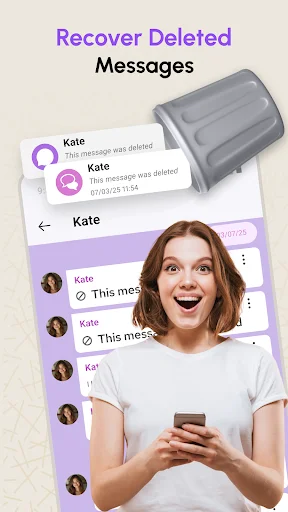
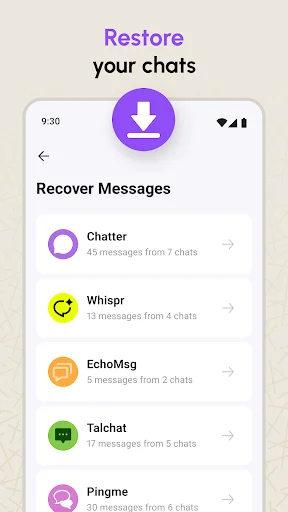
Automatically record text from incoming notifications after setup. If a message gets deleted or a notification disappears, you still have access to what was said.
2
Complete SMS Backup
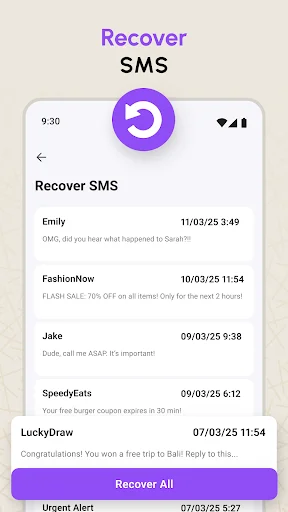
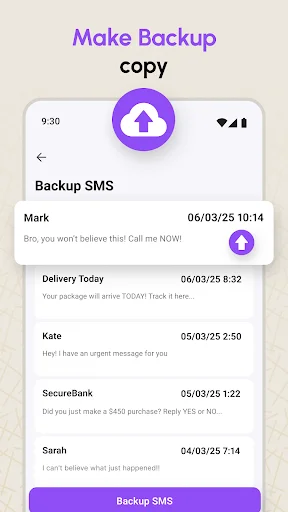
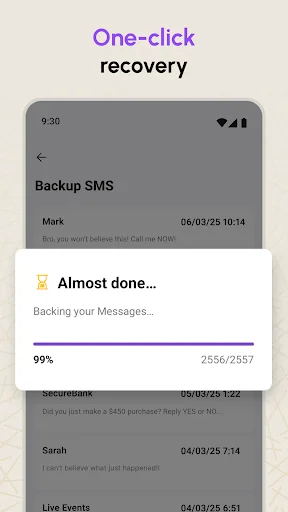
Create and restore local backups of your SMS and MMS messages. Switch devices or recover conversations with easy backup management right on your phone.
3
Privacy You Control
All your notification records and message backups stay stored locally on your device. No uploads to external servers means your private conversations remain truly private.
4
Simple Backup Management
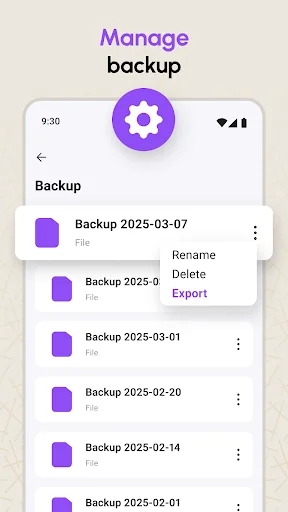
Browse your saved notifications and backups anytime. Export, share, or delete backup files whenever you want – you have complete control over your data.
1
Save Notification Content
Automatically record text from incoming notifications after setup. If a message gets deleted or a notification disappears, you still have access to what was said.
2
Complete SMS Backup
Create and restore local backups of your SMS and MMS messages. Switch devices or recover conversations with easy backup management right on your phone.
3
Privacy You Control
All your notification records and message backups stay stored locally on your device. No uploads to external servers means your private conversations remain truly private.
4
Simple Backup Management
Browse your saved notifications and backups anytime. Export, share, or delete backup files whenever you want – you have complete control over your data.
About
Important Functional Limitations
Please read these limitations before installing:
- Notification-Based Only: This is not a message-recovery tool. It records only content displayed in Android notifications after the app is installed, set up, and granted Notification Access.
- No Past Messages: The app cannot retrieve messages or notifications received before setup.
- Notifications Are Required: Content may not be logged when a chat is muted or open on screen, notifications are disabled, or previews are hidden.
- No Direct Chat Access: The app cannot access deleted messages from another app, messaging service, remote account, or private chat database.
- Device Restrictions: Battery settings, background restrictions, revoked permissions, force-stopping the app, or certain restarts may interrupt logging.
- Attachment Limits: Images, videos, voice messages, and other attachments cannot be saved unless Android includes accessible details in the notification.
Review captured notifications and manage local message backups.
Notification Log & SMS Backup helps you review notifications captured after setup and create local backups of supported SMS and MMS messages.
How It Works
This app provides two separate functions:
- Notification History: After Notification Access is granted, the app can record text displayed in incoming Android notifications. If a notification is dismissed or its original message is later removed, the previously logged text may remain available.
- SMS Backup & Restore: Create local backup files from supported SMS and MMS messages. Android requires the app to be temporarily selected as the Default SMS handler to restore compatible messages. You can switch back afterward.
Main Features
- Notification History: Review notification text recorded after permission was granted.
- SMS and MMS Backup: Create local backups of supported messages.
- SMS and MMS Restore: Restore compatible messages from a backup.
- Backup Management: Browse, share, export, or delete local backup files.
- Direct SMS: Compose a message to a number without saving it as a contact.
- Web Messaging: Open supported web-based messaging interfaces. External services follow their own terms and privacy practices.
Essential Requirements
- Notification Access: Logging begins only after you manually grant this Android permission.
- Background Operation: The app must be allowed to operate in the background.
- Default SMS App: SMS or MMS restoration requires temporary selection as the Default SMS handler.
- Battery Settings: Battery optimization may prevent some notifications from being recorded.
- Permission Control: Permissions can be removed in device settings, but related features will stop working.
Privacy & Security
- Local Storage: Captured notification records and backup files are stored locally on your device.
- No Developer-Server Uploads: The app does not upload these records or backups to developer-operated servers.
- User-Controlled Sharing: Data may leave your device when you share or export a backup or use an external web service.
- Data Management: You can delete local records and backups within the app. Exported copies must be managed separately.
This independent utility is not affiliated with or endorsed by third-party messaging services.
About
Important Functional Limitations
Please read these limitations before installing:
- Notification-Based Only: This is not a message-recovery tool. It records only content displayed in Android notifications after the app is installed, set up, and granted Notification Access.
- No Past Messages: The app cannot retrieve messages or notifications received before setup.
- Notifications Are Required: Content may not be logged when a chat is muted or open on screen, notifications are disabled, or previews are hidden.
- No Direct Chat Access: The app cannot access deleted messages from another app, messaging service, remote account, or private chat database.
- Device Restrictions: Battery settings, background restrictions, revoked permissions, force-stopping the app, or certain restarts may interrupt logging.
- Attachment Limits: Images, videos, voice messages, and other attachments cannot be saved unless Android includes accessible details in the notification.
Review captured notifications and manage local message backups.
Notification Log & SMS Backup helps you review notifications captured after setup and create local backups of supported SMS and MMS messages.
How It Works
This app provides two separate functions:
- Notification History: After Notification Access is granted, the app can record text displayed in incoming Android notifications. If a notification is dismissed or its original message is later removed, the previously logged text may remain available.
- SMS Backup & Restore: Create local backup files from supported SMS and MMS messages. Android requires the app to be temporarily selected as the Default SMS handler to restore compatible messages. You can switch back afterward.
Main Features
- Notification History: Review notification text recorded after permission was granted.
- SMS and MMS Backup: Create local backups of supported messages.
- SMS and MMS Restore: Restore compatible messages from a backup.
- Backup Management: Browse, share, export, or delete local backup files.
- Direct SMS: Compose a message to a number without saving it as a contact.
- Web Messaging: Open supported web-based messaging interfaces. External services follow their own terms and privacy practices.
Essential Requirements
- Notification Access: Logging begins only after you manually grant this Android permission.
- Background Operation: The app must be allowed to operate in the background.
- Default SMS App: SMS or MMS restoration requires temporary selection as the Default SMS handler.
- Battery Settings: Battery optimization may prevent some notifications from being recorded.
- Permission Control: Permissions can be removed in device settings, but related features will stop working.
Privacy & Security
- Local Storage: Captured notification records and backup files are stored locally on your device.
- No Developer-Server Uploads: The app does not upload these records or backups to developer-operated servers.
- User-Controlled Sharing: Data may leave your device when you share or export a backup or use an external web service.
- Data Management: You can delete local records and backups within the app. Exported copies must be managed separately.
This independent utility is not affiliated with or endorsed by third-party messaging services.
See how easy it is to protect your messages
Join millions who trust us with their messages
This is the best app I've downloaded because I deleted some messages that I really needed but this app recovered them all for me. If you ever delete messages by mistake then just download this app
Simple amazing and does exactly what it says. Even the free version I started with, recovered my deleted messages instantly, despite the poor network in my area.
I accidentally deleted everything following directions I googled to stop group texts from freezing on my android and this recovered everything and saved the day.
A great app! Thank you so much. I was able to recover my very important message I accidentally deleted. I'll be recommrnding this app to my friends
Absolutely the BEST app for restoration!! Love you guys, super easy and FAST! I got all my precious messages back. I'm so happy! THANK YOU.