very good it works but the problem is it shutdowns by itself Edit: It works fine now, it kept shutting down because I kept closing it in the notification bar. (1) ads, the ads aren't that annoying because you don't have to manually open the app just to turn on the screen dim because it is visible on the notification bar and you don't even need to open the app. This app is very good, you don't have to pay for anything and I use this app everyday. This app is an eye-saver.
5,000,000+
Dark Mode for Every Android Device
Transform your phone into a comfortable, eye-friendly experience with system-wide dark mode, blue light protection, and smart scheduling – even on older Android devices without native support.
5,000,000+
Dark Mode for Every Android Device
Transform your phone into a comfortable, eye-friendly experience with system-wide dark mode, blue light protection, and smart scheduling – even on older Android devices without native support.
Everything You Need for Comfortable Screen Time
1
Works on Any Android
Enable dark mode across all your apps, even if your device doesn't offer it natively. Compatible with Android 6 through 15, bringing modern dark mode functionality to older phones.
2
Protect Your Eyes Naturally
Our blue light filter reduces eye strain during nighttime use and helps improve your sleep quality. Use your phone comfortably at any hour without harming your vision.
3
Extend Your Battery Life
Save significant battery power, especially on AMOLED and OLED displays. Enjoy longer phone usage between charges while keeping your screen easy on the eyes.
4
Smart Auto-Scheduling
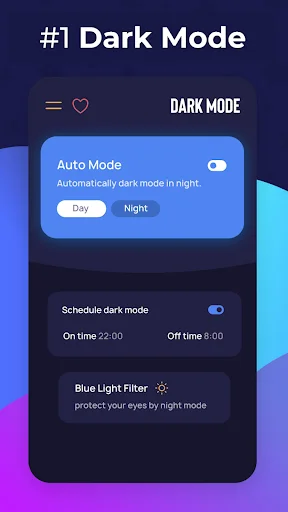
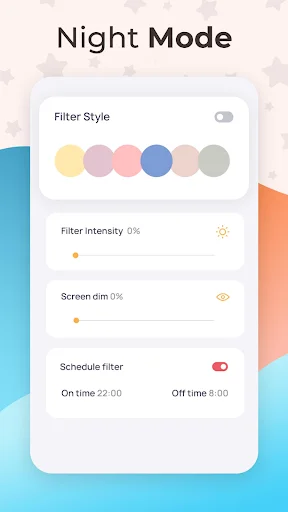
Set your preferred times and let dark mode switch automatically based on your daily routine. No more manual toggling – your phone adapts to your schedule.
1
Works on Any Android
Enable dark mode across all your apps, even if your device doesn't offer it natively. Compatible with Android 6 through 15, bringing modern dark mode functionality to older phones.
2
Protect Your Eyes Naturally
Our blue light filter reduces eye strain during nighttime use and helps improve your sleep quality. Use your phone comfortably at any hour without harming your vision.
3
Extend Your Battery Life
Save significant battery power, especially on AMOLED and OLED displays. Enjoy longer phone usage between charges while keeping your screen easy on the eyes.
4
Smart Auto-Scheduling
Set your preferred times and let dark mode switch automatically based on your daily routine. No more manual toggling – your phone adapts to your schedule.
About
Get Dark Mode - Night Mode in your phone 🌙
Dark Mode helps to activate the Android dark theme on devices that do not provide this option in the system settings, works for android 6, 7, 8, 9 and newer ✔
Night mode allows you to apply a filter to the screen, minimizing eye strain and reducing the blue light emitted by your smartphone screen. And protect your eyes and improve your sleep 😴
- blue light filter protects your eyes from the phone screen. When you use mobile at night. The Screen harm your eyes. This app makes your phone screen Night Mode. So your eyes are not damaged by a screen. 🤓
Activate the Android Dark Mode - Night Mode. Darken IG, Google Apps, and more!
Dark Mode - Night Mode app Features:
- Dark Mode will give you a beautiful user interface. If you have an AMOLED display,
- Improves the battery life of your phone
- Schedule dark mode by your favorite time
- You can Also Set Schedule Night Mode, which will turn automatically to based on the time of the day on your phone 💫
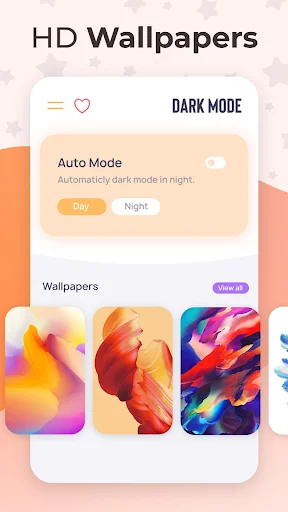
- 1000+ Black & AMOLED 4K wallpapers for your android mobiles in HD, QHD, and 4K resolutions.🌌
- App allows you to set AMOLED 4K wallpaper or save/share the wallpaper with your friends
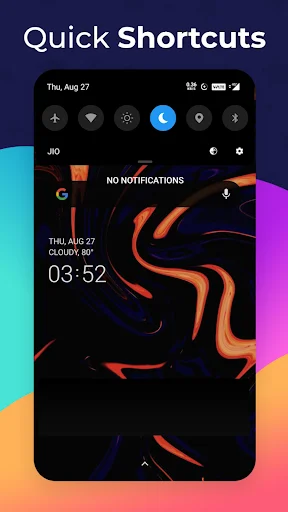
- Get Quick Shortcut in Notification Bar free!
- Support 10+ Languages for easy to use
If your device is not offering the option to activate the Dark Mode, you just found the solution. Activate Dark Mode and protect your eyes!
Dark Mode protects your eyes and conserves battery power, enabling device usage for more extended periods without charging.
Dark Mode is probably one of the most popular features in the modern user interface. We provide you with the best Dark Mode - Night Screen app on the play store with a simple design.
Features:
- Dark Mode saves energy, mainly if the device uses an OLED or AMOLED screen. Enjoy the night mode with the dark screen in your favorite apps.
- While the dark text on a white background is the best in terms of readability, Dark Mode (which has light text on a dark background) is better for reducing eye strain in low light conditions.
- With a dark screen, the screen glare is reduced, thereby minimizing flickering and blue light. Protect your eyes with night screen mode.
When you use the mobile at night, the light screen can harm your eyes. That's why it's essential to use Dark Mode - Night Screen on your device. Protect your eyes with night mode; prevention is the best cure.
Note:
Dark Mode app is neither affiliated with any other app nor claims to own a trademark to use the name and logo of any third-party app.
Use Dark Mode - Night Screen and enjoy a beautiful user interface. The dark screen will reduce the negative effect of your device on your eyes.
Use of Accessibility Service:
Dark Mode app uses the AccessibilityService API to provide the best possible experience.
- We do not collect any personal information through accessibility services.
- We will not read your screen's sensitive data or any content.
- Accessibility services are required for applying the filter over the screen.
About
Get Dark Mode - Night Mode in your phone 🌙
Dark Mode helps to activate the Android dark theme on devices that do not provide this option in the system settings, works for android 6, 7, 8, 9 and newer ✔
Night mode allows you to apply a filter to the screen, minimizing eye strain and reducing the blue light emitted by your smartphone screen. And protect your eyes and improve your sleep 😴
- blue light filter protects your eyes from the phone screen. When you use mobile at night. The Screen harm your eyes. This app makes your phone screen Night Mode. So your eyes are not damaged by a screen. 🤓
Activate the Android Dark Mode - Night Mode. Darken IG, Google Apps, and more!
Dark Mode - Night Mode app Features:
- Dark Mode will give you a beautiful user interface. If you have an AMOLED display,
- Improves the battery life of your phone
- Schedule dark mode by your favorite time
- You can Also Set Schedule Night Mode, which will turn automatically to based on the time of the day on your phone 💫
- 1000+ Black & AMOLED 4K wallpapers for your android mobiles in HD, QHD, and 4K resolutions.🌌
- App allows you to set AMOLED 4K wallpaper or save/share the wallpaper with your friends
- Get Quick Shortcut in Notification Bar free!
- Support 10+ Languages for easy to use
If your device is not offering the option to activate the Dark Mode, you just found the solution. Activate Dark Mode and protect your eyes!
Dark Mode protects your eyes and conserves battery power, enabling device usage for more extended periods without charging.
Dark Mode is probably one of the most popular features in the modern user interface. We provide you with the best Dark Mode - Night Screen app on the play store with a simple design.
Features:
- Dark Mode saves energy, mainly if the device uses an OLED or AMOLED screen. Enjoy the night mode with the dark screen in your favorite apps.
- While the dark text on a white background is the best in terms of readability, Dark Mode (which has light text on a dark background) is better for reducing eye strain in low light conditions.
- With a dark screen, the screen glare is reduced, thereby minimizing flickering and blue light. Protect your eyes with night screen mode.
When you use the mobile at night, the light screen can harm your eyes. That's why it's essential to use Dark Mode - Night Screen on your device. Protect your eyes with night mode; prevention is the best cure.
Note:
Dark Mode app is neither affiliated with any other app nor claims to own a trademark to use the name and logo of any third-party app.
Use Dark Mode - Night Screen and enjoy a beautiful user interface. The dark screen will reduce the negative effect of your device on your eyes.
Use of Accessibility Service:
Dark Mode app uses the AccessibilityService API to provide the best possible experience.
- We do not collect any personal information through accessibility services.
- We will not read your screen's sensitive data or any content.
- Accessibility services are required for applying the filter over the screen.
See Dark Mode in Action
Loved by Over 5 Million Users
I really love this app, I wanted dark mode for my mobile but i my phone never had this setting. This app made it possible for me to use dark mode for instagram and many other apps as well. Today i got an update with dark mode setting. Once again thanks to this app i had one already before the update!
Dark Mode: Night Mode for all apps has been updated now it's works great with Android 9, Android 10, Android 11, Android 12, Android 12, Android 13, Android 14 Android 15 devices and Android Go devices too. The wallpaper feature and the schedule timer, dark mode auto time features are cool too
The app is great! It actually worked on me, i dunno what's with the others, they say that it didn't work on them, but on me it worked. Maybe the problem is on their devices, some devices aren't compatible with this app... but i really recommend this one, i've been using this for ages =)...
It worked thank you. An app I use has dark mode in settings and I set to night but it keeps resetting to system default each time I close it, with this app, system is set to dark mode so I don't have to set any app to dark mode in their settings anymore.
This app reduces eye strain and filters the brightest parts of your devices! It keeps working and rarely asks for currency has ads and immediately give yourself time to pick the filters and colourful options an assortment rainbows of choices!