it gives x and y coordinates and altitude(z coordinate) according to different systems and countries. For example if you have been living in Turkey, you need to choose collect coordinates then Turkey option then the system option you need (ed50 6 utm was wanted from me because i am a mine engineer), and then you can see decimal degrees and x, y coordinates easily. z is altitude from the sea level and although z symbol isn't written, you can see it as altitude.

500,000+
Professional Coordinate Management Made Simple
Work with GPS coordinates across 25+ countries, collaborate with your team in real-time, and access powerful GIS tools – all while working offline in the field.
500,000+
Professional Coordinate Management Made Simple
Work with GPS coordinates across 25+ countries, collaborate with your team in real-time, and access powerful GIS tools – all while working offline in the field.
Everything You Need for Professional Coordinate Work
1
Real-Time Team Collaboration
Share layers with teammates and see their updates instantly on your map. Work together seamlessly, whether you're in the field or at the office, and eliminate communication delays.
2
Work Offline, Sync Later
Collect coordinates and create data in remote locations without internet connection. Your work automatically syncs to the cloud when you're back online, so you never lose progress.
3
Support for 25+ Countries
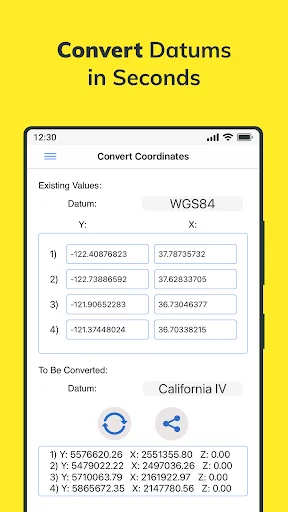
Convert between coordinate systems instantly, from WGS84 to NAD 1983 HARN State Plane and country-specific systems. Get the accuracy your professional work demands.
4
Complete Professional Toolset
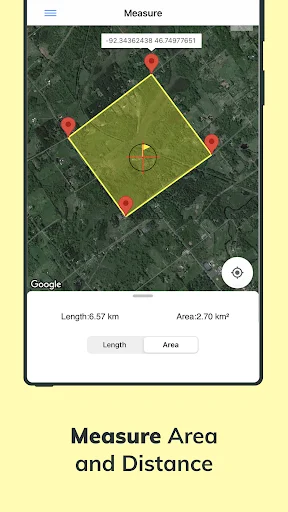
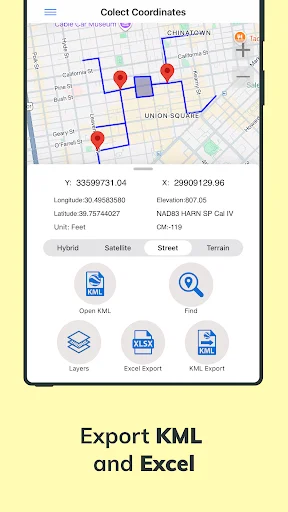
Measure distances and areas, create layers with points and polygons, and export to KML or Excel. Access your data on web or mobile for a seamless field-to-office workflow.
1
Real-Time Team Collaboration
Share layers with teammates and see their updates instantly on your map. Work together seamlessly, whether you're in the field or at the office, and eliminate communication delays.
2
Work Offline, Sync Later
Collect coordinates and create data in remote locations without internet connection. Your work automatically syncs to the cloud when you're back online, so you never lose progress.
3
Support for 25+ Countries
Convert between coordinate systems instantly, from WGS84 to NAD 1983 HARN State Plane and country-specific systems. Get the accuracy your professional work demands.
4
Complete Professional Toolset
Measure distances and areas, create layers with points and polygons, and export to KML or Excel. Access your data on web or mobile for a seamless field-to-office workflow.
About
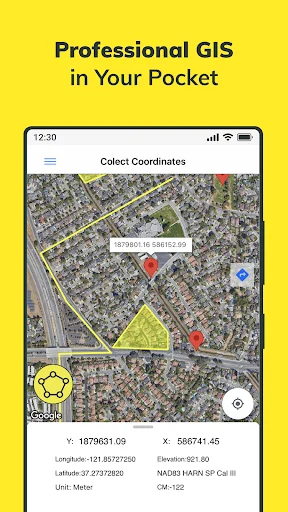
Determine and save GPS coordinates on the map. Convert and find coordinates. Calculate area and distance. Open KML files. Work in many different coordinate systems like WGS84, NAD 1983 HARN State Plane, etc. Map options: Google Maps & Here Maps.
Core Features
- Save your data on device or cloud database.
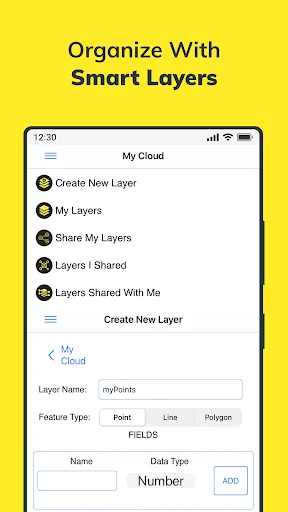
- Create layers and then save points, lines and polygons in layers.
- Share your layers with teammates, work simultaneously with teammates. Instantaneously see the data which is created by other friends on the map.
- Work offline and synchronize.
- Export to KML & Excel files.
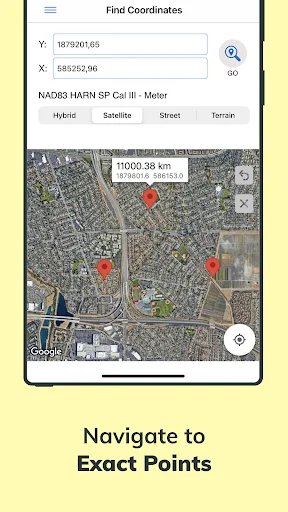
- Search by longitude and latitude. Locate the coordinates on the map. Save that on the cloud. Navigate and get directions to this point by switching to Google Maps from within the app.
- Get the altitude value of a point on the map.
- Convert an existing coordinate into another coordinate system.
- Open previously saved file on the device.
- Take distance and area measurements.
- Use Coordinator Web App so that open your data on the web browser on computer. You can instantly monitor the data movements made in the mobile app in the field.
- Coordinator app contains several useful tools for people interested in coordinates, maps and geographic information systems (GIS).
Supported Coordinate Systems by Country
- World - GPS(WGS 84)
- World - WGS 84 - 6 UTM
- United States - "NAD 1983 HARN State Plane Coordinate Systems(meters & feet)" and "Military Grid Reference System (MGRS)"
- Algeria - "Nord Sahara 1959 / UTM 6 "
- Azerbaijan - "Pulkovo 1942 / Gauss-Kruger 3 " and "Pulkovo 1942 / CS63"
- Bulgaria - "Pulkovo 1942(58) GK 6 "
- Germany - "DHDN/3 GK" and "ETRS89 UTM 6"
- India - "Kalianpur 1975 / India" and "Kalianpur 1975 / UTM 6"
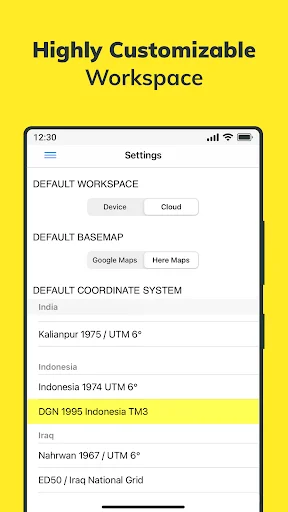
- Indonesia - "Indonesia 1974 UTM 6" and "DGN 1995 Indonesia TM3"
- Iran - "ED50(ED77) / UTM 6"
- Iraq - "Nahrwan 1967 / UTM 6" and "ED50 / Iraq National Grid" and "Karbala 1979 / UTM 6"
- Israel - "Palestine 1923/Palest. Grid" and "Palestine 1923/Israeli CS Grid" and "Israel 1993/Israeli TM Grid"
- Lebanon - "Deir ez Zor / Levant Ster." and "Deir ez Zor / Syria Lambert"
- Mauritania - "Mauritania 1999 / UTM 6"
- Morocco - "Merchich / Nord Maroc" and "Merchich / Sud Maroc"
- Netherlands - "Amersfoort / RD New" and "Amersfoort / RD Old"
- Palestine - "Palestine 1923/Palest. Grid" and "Palestine 1923/Israeli CS Grid" and "Israel 1993/Israeli TM Grid"
- Philippines - "Luzon 1911 / Philippines" and "PRS92 / Philippines"
- Romania - "Dealul Piscului 1930 / Stereo 33" and "Pulkovo 1942(58) / Stereo 70"
- Russia - "Pulkovo 1942 / Gauss-Kruger 3"
- Saudi Arabia - "Ain el Abd / UTM 6" and "Ain el Abd / Aramco Lambert"
- Syria - "Deir ez Zor / Levant Ster." and "Deir ez Zor / Syria Lambert"
- Turkey - "ITRF 96 - 3" and "ED 50 - 3" and "ITRF 96 - 6" and "ED 50 - 6"
- United Arab Emirates - "Nahrwan 1967 / UTM"
About
Determine and save GPS coordinates on the map. Convert and find coordinates. Calculate area and distance. Open KML files. Work in many different coordinate systems like WGS84, NAD 1983 HARN State Plane, etc. Map options: Google Maps & Here Maps.
Core Features
- Save your data on device or cloud database.
- Create layers and then save points, lines and polygons in layers.
- Share your layers with teammates, work simultaneously with teammates. Instantaneously see the data which is created by other friends on the map.
- Work offline and synchronize.
- Export to KML & Excel files.
- Search by longitude and latitude. Locate the coordinates on the map. Save that on the cloud. Navigate and get directions to this point by switching to Google Maps from within the app.
- Get the altitude value of a point on the map.
- Convert an existing coordinate into another coordinate system.
- Open previously saved file on the device.
- Take distance and area measurements.
- Use Coordinator Web App so that open your data on the web browser on computer. You can instantly monitor the data movements made in the mobile app in the field.
- Coordinator app contains several useful tools for people interested in coordinates, maps and geographic information systems (GIS).
Supported Coordinate Systems by Country
- World - GPS(WGS 84)
- World - WGS 84 - 6 UTM
- United States - "NAD 1983 HARN State Plane Coordinate Systems(meters & feet)" and "Military Grid Reference System (MGRS)"
- Algeria - "Nord Sahara 1959 / UTM 6 "
- Azerbaijan - "Pulkovo 1942 / Gauss-Kruger 3 " and "Pulkovo 1942 / CS63"
- Bulgaria - "Pulkovo 1942(58) GK 6 "
- Germany - "DHDN/3 GK" and "ETRS89 UTM 6"
- India - "Kalianpur 1975 / India" and "Kalianpur 1975 / UTM 6"
- Indonesia - "Indonesia 1974 UTM 6" and "DGN 1995 Indonesia TM3"
- Iran - "ED50(ED77) / UTM 6"
- Iraq - "Nahrwan 1967 / UTM 6" and "ED50 / Iraq National Grid" and "Karbala 1979 / UTM 6"
- Israel - "Palestine 1923/Palest. Grid" and "Palestine 1923/Israeli CS Grid" and "Israel 1993/Israeli TM Grid"
- Lebanon - "Deir ez Zor / Levant Ster." and "Deir ez Zor / Syria Lambert"
- Mauritania - "Mauritania 1999 / UTM 6"
- Morocco - "Merchich / Nord Maroc" and "Merchich / Sud Maroc"
- Netherlands - "Amersfoort / RD New" and "Amersfoort / RD Old"
- Palestine - "Palestine 1923/Palest. Grid" and "Palestine 1923/Israeli CS Grid" and "Israel 1993/Israeli TM Grid"
- Philippines - "Luzon 1911 / Philippines" and "PRS92 / Philippines"
- Romania - "Dealul Piscului 1930 / Stereo 33" and "Pulkovo 1942(58) / Stereo 70"
- Russia - "Pulkovo 1942 / Gauss-Kruger 3"
- Saudi Arabia - "Ain el Abd / UTM 6" and "Ain el Abd / Aramco Lambert"
- Syria - "Deir ez Zor / Levant Ster." and "Deir ez Zor / Syria Lambert"
- Turkey - "ITRF 96 - 3" and "ED 50 - 3" and "ITRF 96 - 6" and "ED 50 - 6"
- United Arab Emirates - "Nahrwan 1967 / UTM"
See Coordinator in Action
Trusted by 500,000+ Professionals Worldwide
Hard work pays. It's a good product. Please promote African geological and geodetic geometry always.
Best of all surveying apps. Very happy with the developer
Thank you your prog is what i was looking for .very helpful
I used this software is working good and friendly
fantastic and make things easier than before